


Online shopping has become part of daily life in the United States. People buy clothes, groceries, electronics, food, subscriptions, and even pay bills online. With so many payment methods available, shoppers want something fast, safe, and easy to use. That is where Apple Pay becomes helpful.
If you are wondering how to use Apple Pay online, this complete guide will walk you through everything in simple language. You will learn how Apple Pay works, how to set it up, where you can use it, how to shop online safely, and how to solve common issues.
What Is Apple Pay?
Apple Pay is a digital payment service created by Apple. It allows users to make payments using their Apple devices such as:
- iPhone
- iPad
- Apple Watch
- Mac
Instead of entering your debit or credit card information manually, Apple Pay securely stores your payment information in the Wallet app. When you shop online, you can pay quickly with Face ID, Touch ID, or your device passcode.
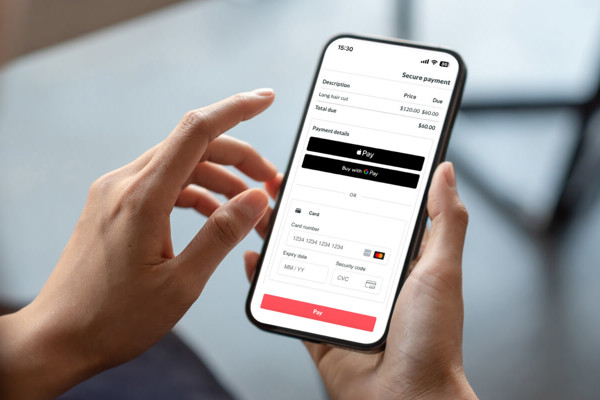
Apple Pay is accepted by thousands of online stores, apps, and websites in the United States and many other countries.
Why More People Use Apple Pay for Online Shopping
Many shoppers prefer Apple Pay because it offers convenience and security at the same time.
Here are some major benefits:
Faster Checkout
You do not need to type your card number, billing address, or security code every time you shop online.
Better Security
Apple Pay does not share your actual card number with merchants. Instead, it uses encrypted payment tokens that protect your information.
Easy to Use
The payment process only takes a few seconds.
Works Across Many Devices
You can use Apple Pay on your iPhone, iPad, Mac, and Apple Watch.
Safer Than Traditional Card Payments
Even if a retailer experiences a data breach, your actual card information remains protected.
How Apple Pay Works Online
Before learning how to pay online using Apple Pay, it helps to understand how the system works.
When you add a debit or credit card to Apple Wallet, Apple encrypts the information and creates a unique device account number. During checkout, Apple Pay sends this encrypted token to the retailer instead of your real card number.
This process helps reduce fraud and keeps your payment information private.
The payment is confirmed using:
- Face ID
- Touch ID
- Device passcode
This extra layer of authentication makes Apple Pay safer than many traditional payment methods.
ALso Read: Pay Child Support Online: Complete Guide for Fast, Secure, and Easy Payments in the USA
Devices That Support Apple Pay Online
To use Apple Pay online shopping features, you need a compatible Apple device.
Supported iPhones
- iPhone 6 and newer
- iPhone SE models
Supported iPads
- iPad Pro
- iPad Air
- iPad mini
- Standard iPad with Touch ID or Face ID
Supported Macs
- Mac models with Touch ID
- MacBooks connected with iPhone or Apple Watch
Apple Watch
Most newer Apple Watch models support Apple Pay.
How to Set Up Apple Pay
Before you can learn how to use Apple Pay for online purchases, you must first set it up.
The setup process usually takes less than 10 minutes.
Step 1: Open the Wallet App
On your iPhone, open the Wallet app.
You will see an option to add a card.
Step 2: Add Your Debit or Credit Card
Tap the plus icon.
You can:
- Scan your card with the camera
- Enter card details manually
Most major banks in the United States support Apple Pay.
Step 3: Verify Your Card
Your bank may ask you to verify your identity through:
- Text message
- Banking app
- Phone call
Once verification is complete, your card becomes active in Apple Pay.
Step 4: Enable Apple Pay on Your Device
Go to your device settings and make sure:
- Face ID or Touch ID is enabled
- Apple ID is signed in
- Wallet permissions are active
Now you are ready to start using Apple Pay online.
How to Use Apple Pay Online
If you are searching for the exact process of how to use Apple Pay online, follow these simple steps.
Step 1: Shop at a Store That Accepts Apple Pay
Many online stores and apps support Apple Pay. During checkout, look for:
- Apple Pay button
- Buy with Apple Pay option
Popular stores that often accept Apple Pay include:
- Target
- Best Buy
- Etsy
- Instacart
- DoorDash
- Nike
- Airbnb
- Walgreens
Some websites also allow Apple Pay directly in the Safari browser.
Step 2: Add Products to Your Cart
Shop normally and place your items into the shopping cart.
Proceed to checkout.
Step 3: Choose Apple Pay at Checkout
Instead of entering card details manually, tap the Apple Pay option.
Your saved payment information will appear automatically.
Step 4: Confirm Shipping and Billing Details
Make sure:
- Shipping address is correct
- Contact details are accurate
- Payment card is selected properly
Step 5: Authenticate the Payment
Depending on your device, you will confirm payment using:
- Face ID
- Touch ID
- Passcode
The payment will process instantly.
That is the full process for how to pay online using Apple Pay.
How to Use Apple Pay for Online Purchases on iPhone
Many users shop directly from their iPhones.
Here is the process:
- Open the shopping app or website
- Add products to your cart
- Tap Apple Pay during checkout
- Double-click the side button
- Use Face ID or Touch ID
- Payment completes instantly
This is one of the fastest ways to complete online purchases.
How to Use Apple Pay for Online Shopping on iPad
Using Apple Pay on iPad is very similar.
Steps:
- Open Safari or a supported app
- Select your items
- Tap Apple Pay
- Verify payment details
- Use Touch ID or Face ID to confirm
The process is smooth and beginner-friendly.
How to Use Apple Pay Online Shopping on Mac
You can also use Apple Pay on supported Mac computers.
Using Mac with Touch ID
- Shop online in Safari
- Choose Apple Pay at checkout
- Confirm payment using Touch ID
Using Mac Without Touch ID
If your Mac does not have Touch ID, you can approve the payment using your iPhone or Apple Watch.
This makes Apple Pay flexible across different Apple devices.
Also Read: How to Pay Property Taxes Online: The Complete Step-by-Step Guide for Homeowners in the USA
Best Websites and Apps That Accept Apple Pay
Many major retailers now support Apple Pay online.
Retail Stores
- Target
- Macy’s
- Nike
- Sephora
- Adidas
Food Delivery Apps
- Uber Eats
- DoorDash
- Grubhub
Travel Services
- Airbnb
- Expedia
Grocery Delivery
- Instacart
Digital Services
- App Store
- Apple Music
- Subscription apps
The number of businesses accepting Apple Pay continues to grow every year.
How Safe Is Apple Pay for Online Shopping?
One reason many users search for how to use Apple Pay online is because they want safer online transactions.
Apple Pay is considered one of the safest payment methods available today.
Security Features of Apple Pay
Tokenization
Your real card number is never shared with the merchant.
Biometric Authentication
Face ID and Touch ID prevent unauthorized access.
Device-Specific Security
Only your approved Apple device can complete the transaction.
Encrypted Transactions
Payment data is encrypted during processing.
No Card Storage on Merchant Servers
Retailers do not keep your actual payment information.
These features help reduce identity theft and payment fraud.
Apple Pay vs Credit Cards for Online Shopping
Many people ask whether Apple Pay is safer than typing card details manually.
Here is a comparison.
| Feature | Apple Pay | Traditional Card Entry |
| Card number shared | No | Yes |
| Biometric security | Yes | No |
| Fast checkout | Yes | Sometimes |
| Fraud protection | High | Moderate |
| Convenience | Very High | Medium |
Apple Pay usually provides a more secure checkout experience.
Common Problems When Using Apple Pay Online
Sometimes users face small issues during checkout.
Here are the most common problems and solutions.
Apple Pay Button Does Not Appear
Possible reasons:
- Website does not support Apple Pay
- Using unsupported browser
- Apple Pay not enabled
Solution
Use Safari browser and confirm Apple Pay is active in settings.
Payment Declined
Possible reasons:
- Expired card
- Insufficient funds
- Bank security block
Solution
Check your bank account and verify card details.
Face ID or Touch ID Not Working
Possible reasons:
- Dirty sensor
- Device settings changed
- Software issue
Solution
Restart the device and re-enable biometric authentication.
Internet Connection Problems
Weak internet may interrupt payments.
Solution
Switch to stable Wi-Fi or mobile data.
How to Use Apple Pay Online Without an iPhone
Some users want to know if Apple Pay works without an iPhone.
The answer is yes in some cases.
You can use:
- iPad
- Mac
- Apple Watch
However, having an iPhone makes setup and management easier.
Can You Use Apple Pay on All Browsers?
Apple Pay works best in Safari.
Some browsers may not fully support Apple Pay checkout.
For the smoothest experience:
- Use Safari on iPhone
- Use Safari on Mac
- Keep software updated
How to Add Multiple Cards to Apple Pay
You can store multiple payment cards inside Apple Wallet.
Examples include:
- Debit cards
- Credit cards
- Business cards
- Travel cards
During checkout, you can choose which card to use.
This helps users manage personal and business spending separately.
How to Change Your Default Card
To change your default payment card:
- Open Settings
- Tap Wallet & Apple Pay
- Select Default Card
- Choose the card you want
The selected card becomes your main payment option.
Apple Pay and Online Subscription Payments
Apple Pay works well for subscriptions.
You can use it for:
- Streaming services
- Fitness apps
- Cloud storage
- Food delivery memberships
This simplifies recurring billing.
How to Track Apple Pay Transactions
Apple Wallet stores recent transaction history.
To view transactions:
- Open Wallet
- Tap your card
- Review recent purchases
Your bank statement will also show completed charges.
Apple Pay for Small Businesses
Small businesses increasingly offer Apple Pay online shopping support because customers prefer faster checkout methods.
Benefits for businesses include:
- Reduced cart abandonment
- Faster payments
- Better customer trust
- Lower fraud risk
Online retailers that support Apple Pay often improve conversion rates.
Apple Pay vs PayPal
Many users compare Apple Pay with PayPal.
Here are the differences.
| Feature | Apple Pay | PayPal |
| Requires Apple device | Yes | No |
| Fast mobile checkout | Excellent | Good |
| Biometric authentication | Yes | Limited |
| Browser compatibility | Mostly Safari | Wider support |
| Security | Very High | High |
Both are good options, but Apple Pay is often faster on Apple devices.
Tips for Safe Apple Pay Online Shopping
To stay secure while shopping online, follow these tips.
Use Trusted Websites
Shop only from reputable online stores.
Enable Two-Factor Authentication
Protect your Apple ID with extra security.
Keep Devices Updated
Install the latest iOS and macOS updates.
Avoid Public Wi-Fi
Public networks may expose personal information.
Monitor Your Transactions
Check your Wallet activity regularly.
Remove Lost Devices Quickly
Use Find My iPhone if your device is lost.
Apple Pay and Privacy
Apple focuses heavily on privacy protection.
Apple Pay does not track:
- What you buy
- Where you shop
- How much you spend
Your transaction details remain more private compared to many payment systems.
Why Apple Pay Is Becoming More Popular
More people are learning how to use Apple Pay for online shopping because online security concerns continue growing.
Consumers want:
- Faster checkout
- Less fraud risk
- Mobile convenience
- Better privacy
Apple Pay meets all these needs in a simple way.
The Future of Apple Pay Online
Digital wallets continue replacing traditional payment methods.
Experts expect Apple Pay adoption to grow because:
- Mobile shopping is increasing
- Contactless payments are popular
- Consumers prefer faster checkout systems
- Security concerns are rising
More online retailers are likely to support Apple Pay in the future.
Also Read: How to Pay Court Fees Online: Complete Step-by-Step Guide for Fast and Secure Payments in the US
Who Should Use Apple Pay Online?
Apple Pay is ideal for:
- Frequent online shoppers
- Busy professionals
- Families
- Students
- Travelers
- People concerned about online security
If you already own Apple devices, Apple Pay can simplify your online payments significantly.
Final Thoughts
Learning how to use Apple Pay online is easier than many people expect. The setup process is quick, the checkout experience is simple, and the security features are excellent.
Whether you want to know how to pay online using Apple Pay, how to use Apple Pay for online purchases, or how to use Apple Pay online shopping safely, the process is designed for convenience and protection.
Apple Pay helps users avoid typing card details repeatedly while improving payment security. As more stores and apps continue supporting digital wallets, Apple Pay is becoming one of the most trusted payment methods for online shopping in the United States.
If you already use an iPhone, iPad, or Mac, Apple Pay can make your online shopping faster, easier, and safer every day.
FAQs About How to Use Apple Pay Online
Can I Use Apple Pay on Amazon?
Currently, Amazon does not fully support Apple Pay as a direct payment option on most purchases.
Is Apple Pay Free to Use?
Yes. Apple Pay is free for consumers.
Do All Banks Support Apple Pay?
Most major US banks support Apple Pay, but some smaller banks may not.
Can I Use Apple Pay Internationally?
Yes. Apple Pay works in many countries around the world.
Does Apple Pay Charge Extra Fees?
No additional fees are charged for normal consumer transactions.
Can I Get Refunds Through Apple Pay?
Yes. Refunds return to the same card connected to Apple Pay.
Is Apple Pay Better Than Google Pay?
Both are secure digital wallets. Apple Pay works best for Apple device users.
Can Teenagers Use Apple Pay?
Yes. Families can set up Apple Cash and parental controls for younger users.
What Happens If My iPhone Is Lost?
You can use Find My iPhone to lock or erase the device remotely.
Can I Use Apple Pay for Recurring Bills?
Yes. Many subscription services accept Apple Pay for recurring payments.
Does Apple Pay Work With Debit Cards?
Yes. Both debit cards and credit cards can be added.
Can I Use Apple Pay Without Internet?
For many online purchases, internet access is required.
Why Is Apple Pay Not Working on Some Websites?
Some websites simply do not support Apple Pay yet.
Can I Remove a Card Anytime?
Yes. You can add or remove cards whenever you want.
Is Apple Pay Safe for Large Purchases?
Yes. Apple Pay uses advanced encryption and authentication for all transaction sizes.
